Full disclosure: I own Avetlist and earn from purchases made through this site, so keep that in mind as you read this. This post is about a separate personal tool I built for my own use - shared here to help other sellers understand what is possible with AI assistance.
Note: This guide is current as of May 2026. Amazon's SP-API terms, fee structures, and developer policies are subject to change. Always verify current terms at developer.amazonservices.com before building your own tool. Avetlist is not affiliated with, endorsed by, or sponsored by Amazon.com, Inc.
The Software Is $0. I Pay $6/Month for a Server. Here Is Exactly How I Built It.
I want to start with something honest.
I am a housewife who sells on eBay and Amazon. I am not a software engineer. I do not have a tech background. And for a long time, I was paying a monthly subscription for a wholesale scanning tool that I felt I was not getting full value from.
One day I asked Claude AI a simple question:
"I am paying a monthly fee for a scanning tool I don't use much. Is there a cheaper way to do this?"
What happened next changed how I run my entire wholesale sourcing operation. Within 2 days, I had a fully working bulk scanning tool running live on the internet - built entirely with Claude AI's help, using Amazon's own free official API, at zero software cost.
This post is the full story. Every step. Every question answered. If you sell wholesale on Amazon and you are paying for scanning software, read this carefully.
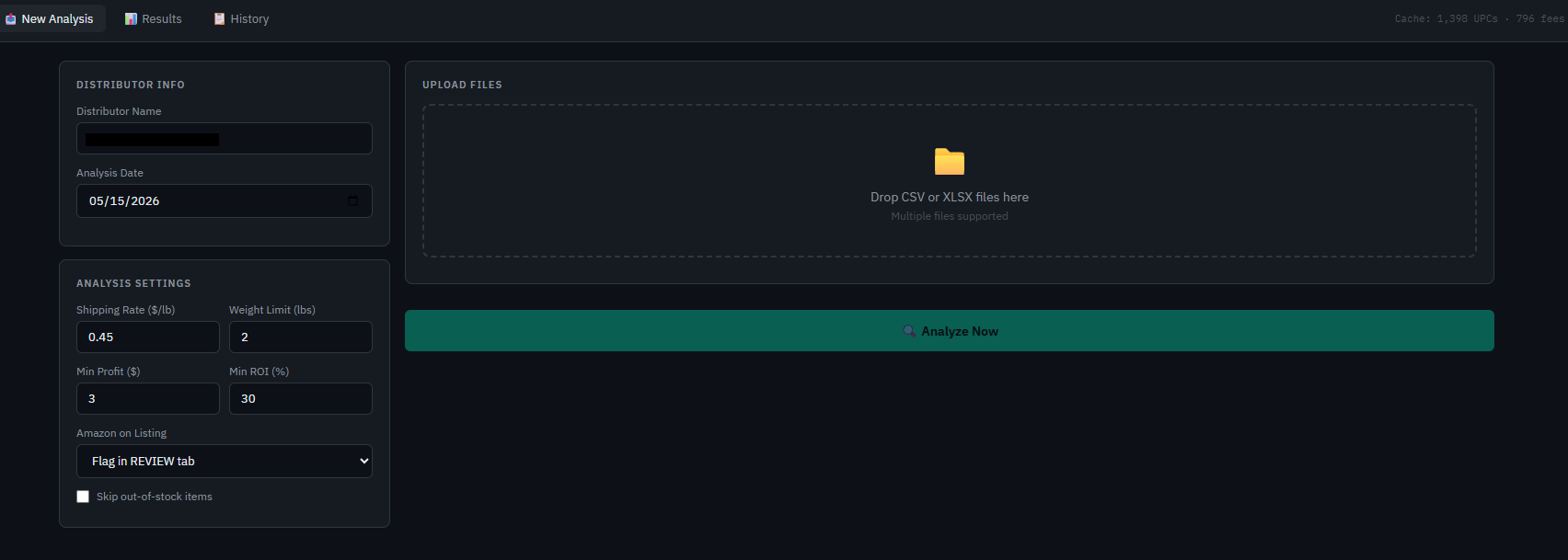 New Analysis screen - enter distributor name, set your filters (min profit, min ROI, weight limit), upload your CSV or XLSX price list, and click Analyze Now. Results appear in seconds.
First - What Problem Was I Actually Trying to Solve?
Before I explain what I built, let me explain what I was dealing with every time I received a price list from a distributor.
When a distributor sends you a price list, it is usually a big Excel or CSV file. Could be 1,000 rows. Could be 5,000 rows. Each row has a product, a UPC code, your dealer cost, weight, and some other details.
To figure out which products are worth buying for Amazon FBA, I had to:
- Open the distributor file
- Open my scanning tool separately in another window
- Cross-reference each product one by one
- Try to figure out which ones were profitable
- Still not feel confident because the data was spread across two different places
The biggest frustration was this - I did not know which products were good and which ones to skip without checking every single one. I had to go through all the outputs after applying some filters, and even then I was not confident I had the full picture. It took hours every single time a new price list arrived.
I had two specific problems I needed to solve:
Problem 1 - No automatic filtering. I had to manually remove inactive items, products that were too heavy for FBA, items restricted in my state, products with no UPC, and items with no cost listed. All of that manually, row by row, before I could even start analyzing.
Problem 2 - Data split across multiple tools. The distributor file was open in one window. The scanning tool results were in another window. I had to constantly switch between them, copy numbers, and try to piece together whether a product was actually profitable. I never had the full picture in one place.
I wanted one tool that solved both problems at the same time. I just did not know how to build it - until I asked Claude.
How Claude AI Came Into the Picture
I was not looking for a coding tutorial. I just asked Claude a straightforward question about saving money on my scanning subscription.
Claude's response surprised me. It explained that Amazon has a completely free official API called the Selling Partner API (SP-API) that gives every Amazon seller direct access to the exact same data that paid scanning tools use - Buy Box prices, FBA fees, sales rank, listing restrictions, and more.
The most important thing Claude told me: if you build a private tool for your own use only, Amazon's published developer terms as of May 2026 support private seller use at no cost. Always verify current terms at developer.amazonservices.com before building your own tool - API terms can change.
I had no idea this existed. I had been paying monthly for data that Amazon was willing to give me directly.
Claude then walked me through every single step needed to get started:
- How to register as a private developer on Seller Central
- Which specific options to click during registration
- How to get my API credentials - the three keys you need to connect to Amazon's API
- How to open the right tools on my computer
- How to run commands in PowerShell step by step
- What each step meant the whole way through
I followed the instructions exactly as Claude described them. I had zero coding experience. I had never heard of an API before this. Claude explained everything as if I was someone who had never seen code before - because I hadn't.
I Showed Claude My Distributor File and Said "This Is What I Need"
Once the API access was set up, I did something very simple. I shared the structure of my distributor price list with Claude and said: "This is what my distributor file looks like. This is what I want to see as the output."
I described exactly what I needed:
- Automatically filter out inactive products
- Automatically filter out products over 2 lbs
- Automatically filter out items restricted in my state
- Automatically filter out items with no UPC
- Look up each remaining product on Amazon
- Get the Buy Box price, the Amazon fees, my profit, my ROI, and whether Amazon itself is selling
- Show me a clear BUY, REVIEW, or SKIP result for each item
- Put everything together in one place so I never need to open two tools at once
- Download everything as a formatted Excel file when I am done
Claude built it. Step by step, it wrote the code, explained what each part did, and told me exactly where to put it and how to run it on my server.
When something was not working, I described the problem to Claude. Claude fixed it. When I did not understand something, I asked. Claude answered simply every time.
The best part - I could also tell Claude exactly how I wanted the website to look and what columns I wanted to see. Every time I wanted something changed or added, I described it and Claude updated it. You can fully customize the tool to match your own sourcing workflow.
What the Tool Actually Does - Step by Step
Here is exactly what happens when I upload a distributor price list now:
Step 1 - Automatic Filtering Happens Instantly
The moment I upload the file, the tool automatically removes:
- Items the distributor has marked as inactive or discontinued
- Items over 2 lbs (too heavy for standard FBA shipping)
- Items restricted in Texas (my state - yours would be different and you can set your own)
- Items with no UPC code to look up on Amazon
- Items with no cost listed
I used to do all of this manually before I could even start. Now it happens in seconds without me touching anything. A file with 3,000 rows might come down to 1,400 usable rows automatically.
Step 2 - Amazon Looks Up Every Remaining Item
For every item that passes the filters, the tool contacts Amazon's free SP-API and pulls back:
- The current Buy Box price
- The Amazon referral fee
- The FBA fulfillment fee
- The Best Sellers Rank
- How many FBA sellers are already competing
- Whether Amazon itself is selling the product
Step 3 - Profit Is Calculated for Every Item
For each item the tool calculates automatically:
- Shipping cost to FBA warehouse = weight × $0.45 per lb (Note: actual inbound shipping rates vary by product category, size tier, and destination - use this as an estimate and adjust based on your own shipping costs)
- Your total cost = dealer price + shipping to FBA
- Net profit per unit = Buy Box price minus your total cost minus all Amazon fees
- ROI percentage = net profit divided by your total cost times 100
- Profit per full case = net profit times units per case
Step 4 - Every Item Gets a Clear Recommendation
🟢 BUY - Profitable, in stock, no MAP violation, Amazon not competing directly
🟡 REVIEW - Profitable but worth a second look. For example Amazon is on the listing, or the item is currently out of stock at the distributor
🔴 SKIP - Not profitable, price is below MAP, not found on Amazon, or the numbers do not work
Here Is What the Results Screen Looks Like
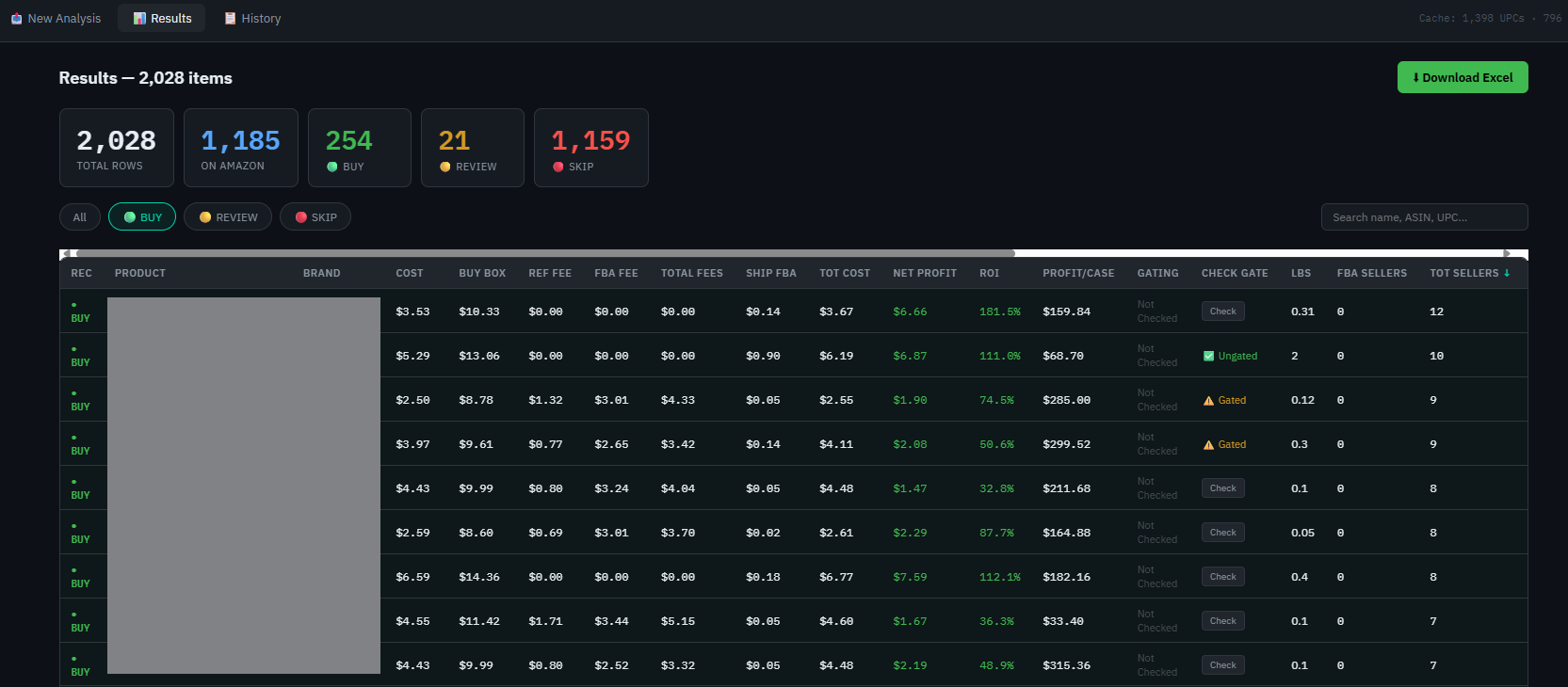 Results screen - every product shows dealer cost, Buy Box price, FBA fees, net profit (green), ROI%, profit per case, gating status, and seller count. Filter by BUY, REVIEW, or SKIP. Download Excel with one click. Product names blurred to protect sourcing data.
Every row shows my dealer cost, the Amazon Buy Box price, the referral fee, the FBA fee, total fees, net profit highlighted in green, ROI percentage, profit per full case, gating status, number of FBA sellers, number of total sellers, and the Best Sellers Rank.
At the very top is a summary: total rows analyzed, how many were found on Amazon, and the BUY / REVIEW / SKIP count at a glance.
I can filter to see only BUY items. I can search by product name, ASIN, or UPC. I can sort any column. When I am done reviewing, one click downloads a formatted Excel file with everything organized into separate BUY, REVIEW, and SKIP tabs.
And Here Is the History Screen
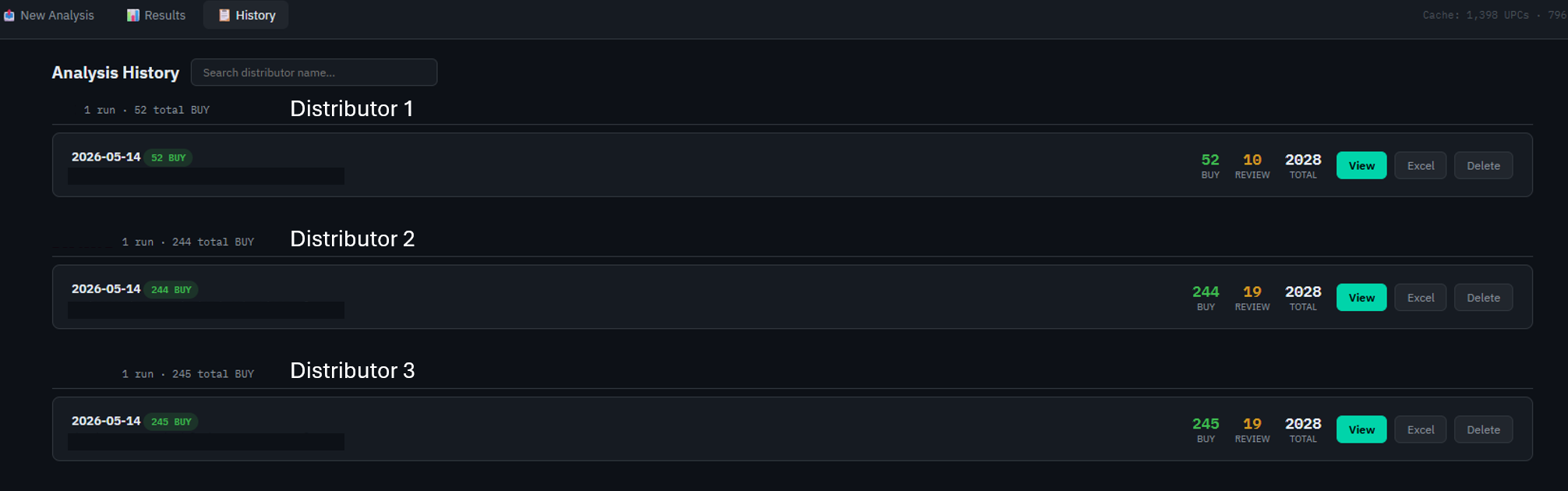 History screen - every analysis saved automatically by distributor name and date. See BUY count at a glance. Re-download any past Excel file anytime. Track which distributors consistently produce good opportunities.
Every analysis I run is saved automatically. The History screen organizes everything by distributor name and date. I can see at a glance how many BUY opportunities each distributor produced and go back and re-download any past Excel file at any time.
This is useful for tracking which distributors consistently produce good opportunities and which ones rarely produce anything worth buying.
The Two Problems I Actually Solved - Revisited
Problem 1 - Manual filtering: SOLVED I no longer spend any time cleaning up the distributor file before I can start analyzing. The tool handles every filter automatically the moment I upload.
Problem 2 - Data split across multiple tools: SOLVED Now I open one website. I upload one file. I see one result with everything combined. The distributor data and the Amazon data are merged into a single row for every product.
How Long Did the Build Actually Take?
Two days.
I am not a programmer. I had never built a website. I had never heard of Flask, SQLite, or SP-API before this project started.
Day 1: Registered as a private developer on Seller Central following Claude's exact instructions. Got my three API credentials. Set up a server. Claude wrote the first version of the tool and told me exactly how to get it running.
Day 2: Connected all the pieces together. Uploaded my first real distributor price list. Saw real results for the first time. By the end of the day the tool was fully working.
Every time something went wrong, I described it to Claude. Claude fixed it.
What Does It Cost?
| Item | Monthly Cost |
|---|---|
| Amazon SP-API access | $0 - per current developer terms |
| The scanning software itself | $0 - built with Claude AI |
| Server (runs 24/7) | $6/month |
| Total | $6/month |
Note: Amazon's API terms are subject to change. Verify current developer pricing at developer.amazonservices.com before building.
Why Is Amazon's API Free for Private Sellers?
Amazon built the Selling Partner API so that sellers could automate and improve their own business operations. Per Amazon's published developer terms as of May 2026, private sellers building tools for their own use are not subject to the fees that apply to third-party developers selling software to others.
Always verify current terms before building - API policies can change.
Do You Need to Know How to Code?
No.
What you need is the ability to describe what you want. Claude AI handles the rest.
Claude is the developer. You are the business owner who knows what the business needs. You tell Claude what problem you are trying to solve, what your data looks like, and what you want the output to look like. Claude builds it.
I am a housewife with zero coding experience. I described my problem. I showed Claude my distributor file. I told Claude what I wanted to see in the results. Claude built it in 2 days.
If you can describe your problem clearly, you can build this.
Common Questions From Wholesale FBA Sellers
Will Amazon flag my account for using the API? Using SP-API for your own private business is what Amazon designed it for. You are automating what you would otherwise do manually. That said, always review Amazon's current developer terms to ensure compliance.
What if I have a very large file with tens of thousands of rows? The tool handles large files. The first run takes longer because it looks everything up fresh from Amazon. After that it saves everything in a local cache. Over time as your cache grows, even very large files process much faster.
Can I use this if my distributor gives me ASINs instead of UPCs? Yes. The tool has a column mapping feature. You tell it which column has the UPC or ASIN and it works from there.
What about gating - can it tell me if I am approved to sell something? Yes. There is a Check button on every row. Click it on any product and it checks Amazon's gating API in real time. Results are: Ungated, Gated, or Hard Gated.
Is my sourcing data safe? Yes. Everything runs on your own private server. No third party has access to your distributor data, your API credentials, or your results.
Can I customize the tool to match my own workflow? Yes - completely. Because you are building it yourself with Claude's help, you can ask Claude to add any column, change any filter, or adjust any threshold.
One More Thing - Finding the Right Distributors
The tool I built solves the analysis problem. Once you have a distributor's price list, it tells you exactly which products are worth buying.
But before you can analyze a price list, you need a distributor who is willing to work with you and send you one. That is a completely separate challenge - and it is the problem that Avetlist was built to solve.
I built the scanner to solve the analysis problem. I use Avetlist to find the distributors who provide the data I am scanning. One builds the engine. The other provides the fuel.
Browse Vetted Wholesale Distributors on Avetlist →
Bonus - The Exact Prompt I Used to Start the Build
If you want to try building your own version, here is the exact first prompt I gave Claude AI:
"I sell wholesale on Amazon FBA. I receive distributor price lists as Excel or CSV files with columns for product name, UPC, my cost, and weight. I want to build a private web tool that automatically filters out inactive items, items over 2 lbs, items with no UPC, and items with no cost - then looks up each remaining item on Amazon using SP-API to get the Buy Box price, FBA fees, and whether Amazon is selling it - then calculates my net profit and ROI and shows me a BUY, REVIEW, or SKIP result for each item. I want to download the results as an Excel file. I have zero coding experience. Walk me through everything step by step starting from the beginning."
That single prompt started the entire build. Claude asked me clarifying questions, then walked me through every step from API registration to a working website in 2 days.
Disclaimer: This post is for educational purposes only. The tool described here is a private application built for my own business use only. I do not offer this as a service to other sellers and I am not sharing source code or API credentials. Before building your own tool, review Amazon's Selling Partner API documentation and developer terms at developer.amazonservices.com. Manage your own rate limits and API usage responsibly. Results shown in screenshots are from my personal account and are not representative of typical or guaranteed outcomes. Avetlist is not affiliated with, endorsed by, or sponsored by Amazon.com, Inc.
Frequently Asked Questions
What is Avetlist?
Avetlist is a vetted directory of 21,000+ USA wholesale distributors across all 50 states and 15 product categories, built for Amazon, Walmart, eBay sellers, and brick-and-mortar store owners.
How is Avetlist different from other wholesale directories?
Unlike general wholesale directories, Avetlist focuses exclusively on vetted USA distributors scored on 15+ signals with no dropshippers or manufacturers mixed in. Delivered instantly as a filtered Excel file.
How do I find wholesale distributors for my state?
Visit avetlist.com/shop, select your state and product category, and purchase your filtered directory. You receive an instant Excel file with vetted wholesale distributors.
Do I need an LLC to buy from wholesale distributors?
Most wholesale distributors require a business entity such as an LLC or DBA, an EIN, and a state resale certificate to open a wholesale account.
Is the Avetlist directory updated regularly?
Yes. The directory was last updated in April 2026 and covers all 50 states across 15 product categories.
Ready to Find Vetted Wholesale Distributors?
Browse 21,000+ vetted USA wholesale distributors across all 50 states and 15 product categories.